
Tina Gets Smarter: What’s New with the Tenant Turner AI Virtual Agent
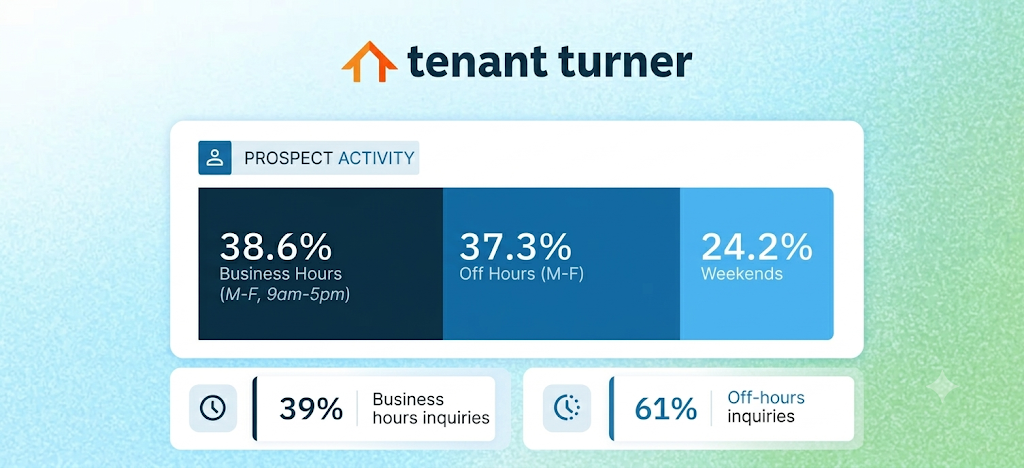
Here’s a number that should change how you think about your leasing workflow: 61% of prospect activity happens outside business hours.
That’s 37.3% off-hours on weekdays and another 24.2% on weekends, according to our internal platform data.
Less than 40% of inbound demand arrives when your team is at their desks.

Of course, prospects self-schedule tours through Tenant Turner around the clock. But if they have a question first (even if it’s already answered in your listing) they have to wait for an answer.
But they’re not going to wait. They’ll get distracted before you can respond. Or worse, they’ll schedule with a rival property that answers immediately.
That’s the gap Tina was built to close, and she’s been closing it since launch.
Along the way, we’ve been listening to the property managers who use her every day. They told us what matters most: accuracy, context, and trust.
So we spent the last two months rebuilding Tina around that feedback. Here’s what’s changed.
Your team never misses a handoff
When Tina handles a conversation and reaches a point where a human needs to take over, she passes it to your team.
Previously, those AI-generated lead notifications could get buried. The subject line didn’t signal what needed attention, and a high-priority prospect conversation could sit unread in an inbox.
That’s changed.
- Lead emails are now marked ACTION REQUIRED.
- The conversation appears as an unread text message with both app and email notifications.
- A dedicated filter on the Leads tab lets your team locate and respond to AI-generated leads without digging through the queue.
When Tina passes something off, your agents know about it immediately.
Tina’s getting better at the details
Tina’s getting better at the details
Beyond the handoff improvements, the team has been shipping steady refinements since launch. A few worth knowing about:
1. She screens prospects in their own language.
Pre-qualification questions go out to prospects in whatever language they’re using. So non-English-speaking prospects stay engaged through the process. And their answers come back to your dashboard in English without creating any translation burden on your side.
2. She starts every web chat with the right context.
When a prospect begins chatting from a listing page, Tina already knows which property they’re asking about. No “which property were you inquiring about?” moment — the conversation starts with the right context from the first message. And when a prospect is comparing several properties, the information stays tied to the right one every time.
3. She knows where each prospect stands.
Tina knows who has applied, who has a tour booked, and when a showing changes. So when a prospect asks “When’s my tour?” she answers correctly, and she won’t steer someone toward a duplicate application.
4. She gives sharper answers on the basics.
Responses on fees, deposits, and office hours are more precise, with hours shown in each property’s local time. She can also answer questions about nearby schools, parks, and restaurants with real travel distances.
5. She works from your information.
The new Knowledge API lets Tina draw on your property and company details, so her answers reflect how you run your business.
6. She’s less likely to make premature claims.
Guardrails on action statements have been tightened. Tina is now less likely to state available tour times, confirmed bookings, etc. before they’ve been verified. Guardrails on sensitive topics like approvals are stronger too, and when something is unclear, she asks for clarification instead of guessing. If you’re worried about an AI making a commitment it can’t back up, this is the kind of ongoing work that should reassure you.
7. She matches amenities more precisely.
Tina now distinguishes unit-level amenities from property-level ones, so when a prospect asks “does it have in-unit laundry?” they get the right answer. These improvements won’t grab the headline, but taken together, they’re the difference between an agent that works and one that works well.
The off-hours problem isn’t going away
61% of your inbound demand is arriving when the default response is silence. That was true when Tina launched, and it’s true now.
The question is what you do about it.
Tina is available 24/7, responds to every inquiry, qualifies prospects against your criteria, and hands off to your team with full context when she needs to. And she’s getting sharper every day.
Now she can reach out first, too. Tina can text leads proactively, re-engage prospects who went quiet, and move them toward a booked showing without adding work for your team.
If you haven’t enabled Tina yet, there’s never been a better time to try her out. She’s free for 30 days, SMS included — no commitment, no configuration headaches. And if you tried her before and switched her off, give her another look. This is a different agent from the one you turned off.
To activate Tina, follow the instructions below. It takes less than a minute for existing customers.
Existing customers: Go to Add-Ons in your Tenant Turner dashboard to activate the AI Virtual Agent.
New customers: Schedule a Demo
Get Leasing Automation tips and solutions right to your inbox.